Dashboard
Introduction
Section titled “Introduction”The Dashboard is the first screen you see after signing in. It gives you a live, at-a-glance summary of the facility’s current patient census — how many patients are in-house right now, broken down by where they are in the admission lifecycle — along with a shortcut list of the most recently active encounters.
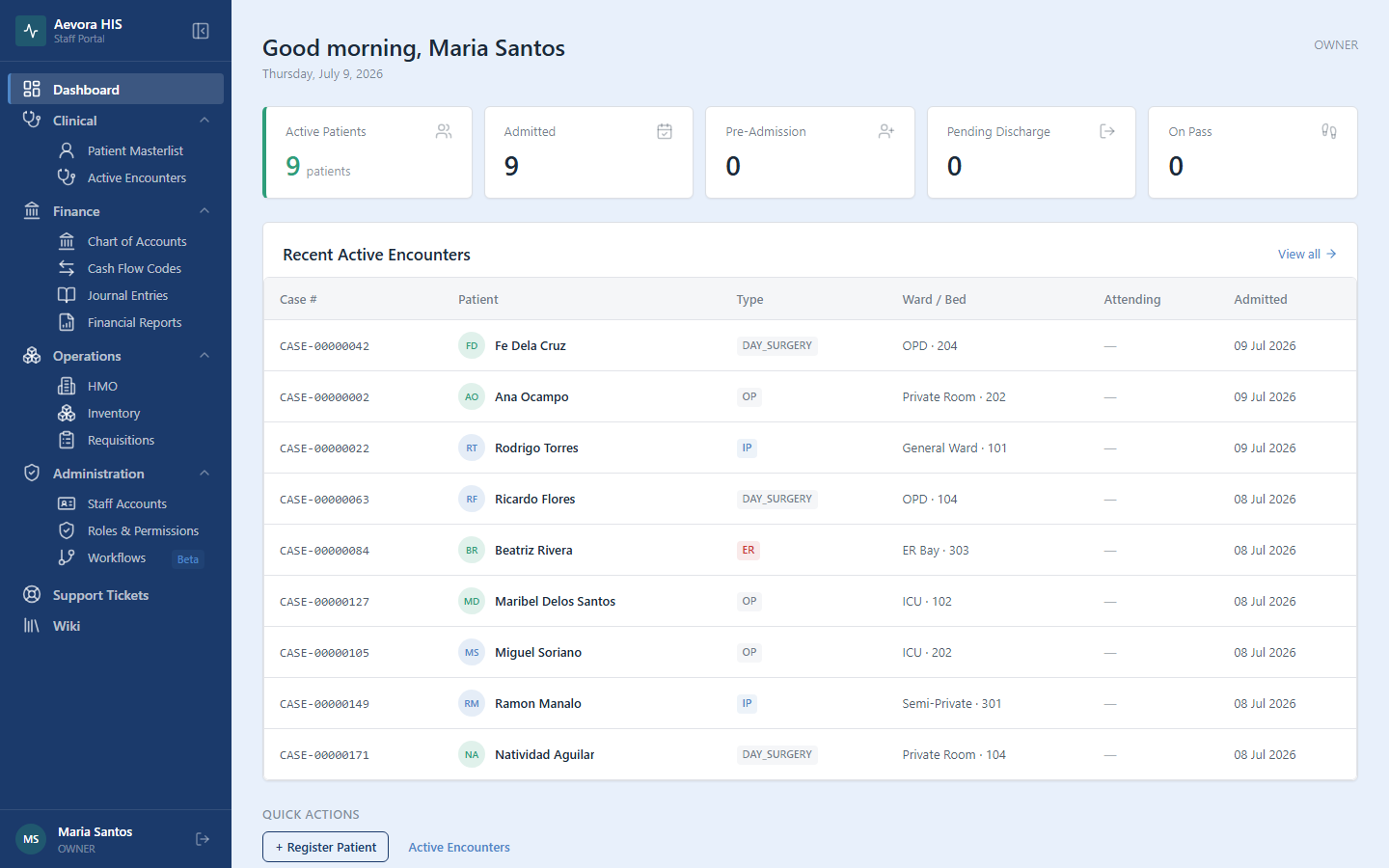
There is nothing to configure here. What you see is scoped automatically to your facility and filtered by your role’s permissions — a nurse and a cashier looking at the same dashboard at the same moment will not see identical content, because the Recent Active Encounters panel only appears for staff with clinical visibility (see below).
Key Concepts
Section titled “Key Concepts”Dashboard KPI Cards
Section titled “Dashboard KPI Cards”The five stat cards summarize your facility’s currently-open encounters (called intakes in the system) by status:
| Card | What it counts |
|---|---|
| Active Patients | Every open encounter — the sum of Pre-Admission, Admitted, Pending Discharge, and On Pass. This is a count of open encounters, not unique patients: a patient with two simultaneous encounters would be counted twice. |
| Admitted | Encounters currently in the ADMITTED state — the patient is in-house and under active care. |
| Pre-Admission | Encounters that have been opened but the patient has not yet been formally admitted. |
| Pending Discharge | Encounters cleared for discharge by the physician but not yet finalized — usually waiting on billing or workflow clearance. |
| On Pass | Encounters where the patient has temporarily left the facility (e.g., a day pass) but the encounter remains open. |
A card turns amber when its count is above zero for the statuses that represent something needing attention (Pre-Admission, Pending Discharge) — it’s a visual cue to check the corresponding list, not an error state.
Reference
Section titled “Reference”Recent Active Encounters Panel
Section titled “Recent Active Encounters Panel”Below the stat cards, the Recent Active Encounters panel lists the 10 most recently admitted open encounters, with columns for Case #, Patient, Type (OPD/IPD/ER), Ward/Bed, Attending physician, and Admission date. Click any row to jump straight to that patient’s record, or click View all to open the full Active Encounters list.
This panel is only visible to staff with the patient → view permission. If you don’t see it, your role doesn’t include clinical visibility — see Roles & Permissions.
Quick Actions
Section titled “Quick Actions”Staff with patient → view also see a Quick Actions row with shortcuts to Register Patient and Active Encounters, saving a trip through the sidebar for the two most common clinical actions.